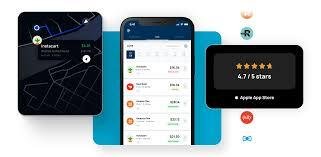
Managing business expenses and tracking mileage can be tedious, especially for freelancers, self-employed professionals, and small business owners. Everlance is a popular app that promises to simplify this process. In this Everlance Review, we’ll dive into its features, pricing, pros and cons, and whether it’s worth using for your business in 2026.
With tax season approaching and IRS mileage deductions requiring precise tracking, choosing the right tool is more important than ever. This review gives you a complete picture of how Everlance works and what to expect.
What Is Everlance?
Everlance is a mobile app designed to help users automatically track mileage and expenses. Its primary goal is to save time and reduce errors for freelancers, independent contractors, and small business owners who need accurate records for tax reporting or reimbursement.
Key benefits of Everlance include:
Automatic mileage tracking using GPS
Expense tracking and receipt capture
IRS-compliant reporting
Integration with accounting software like QuickBooks
Everlance eliminates the need for manual logbooks, spreadsheets, and paper receipts, making it a favorite among professionals on the go.
Core Features of Everlance
1. Automatic Mileage Tracking
Everlance tracks your trips automatically in the background. It can differentiate between personal and business trips, providing accurate reports for tax deductions.
2. Expense Tracking
Users can photograph receipts and categorize expenses directly in the app. This helps with budgeting and ensures all business costs are accounted for.
3. Tax Reporting
Everlance generates IRS-compliant reports that make tax filing easier. You can export reports for accountants or self-filing purposes.
4. Integration and Syncing
Everlance integrates with accounting software, bank accounts, and credit cards. This provides a seamless way to manage all business finances in one place.
5. Cloud Storage
All data is securely stored in the cloud, ensuring your mileage and expense history is always accessible.
How Everlance Works
Download & Set Up: Install the Everlance app from Google Play or the Apple App Store.
Grant Permissions: Allow location and motion tracking for accurate mileage tracking.
Customize Settings: Set your business categories, tax year, and reporting preferences.
Track Automatically: Everlance tracks trips in the background without manual input.
Generate Reports: At the end of the month or tax year, export reports in PDF or CSV formats.
This automation makes managing business expenses simple, even for busy professionals.
Everlance Pricing
Everlance offers both free and premium plans:
Free Plan
Basic mileage tracking
Limited expense logging
Manual reporting
Ideal for freelancers with simple tracking needs
Premium Plan
Automatic mileage tracking
Unlimited expense tracking
IRS-compliant reports
Integration with accounting tools
Monthly or annual subscription options
The premium plan is best for users with frequent travel or multiple expense categories.

Pros and Cons of Everlance
Pros
Automatic mileage tracking saves time
Easy-to-use interface
Cloud backup ensures data security
IRS-compliant reports simplify tax filing
Integrates with major accounting platforms
Cons
Premium subscription required for full functionality
GPS tracking may drain battery on some devices
Occasional trip misclassification can occur
Overall, Everlance provides excellent value for professionals who need reliable mileage and expense tracking.
Who Should Use Everlance?
Freelancers and independent contractors
Small business owners
Rideshare drivers
Remote sales professionals
Anyone who needs accurate mileage for tax deductions
Alternatives to Everlance
While Everlance is popular, some users may also consider:
Stride – Great for simple mileage tracking and fitness-oriented users
MileIQ – Focused on automatic mileage logging
QuickBooks Self-Employed – Combines expense tracking and accounting tools
Each alternative has its own strengths, but Everlance stands out for a balance of automation, ease of use, and reporting features.
Frequently Asked Questions
Is Everlance free?
Yes, a basic free plan exists, but premium features require a subscription.
Does Everlance work internationally?
Yes, it tracks trips worldwide, though premium currency support may vary.
Can I export reports to my accountant?
Absolutely, reports can be exported in PDF or CSV format for easy sharing.
Does Everlance drain battery?
Continuous GPS tracking may slightly impact battery life, but optimizations minimize usage.
Final Thoughts
In summary, Everlance is a highly effective tool for anyone needing accurate mileage and expense tracking. This Everlance Review shows that the app simplifies financial management, saves time, and ensures compliance with tax rules.
Whether you are a freelancer, small business owner, or rideshare driver, Everlance provides a reliable, automated solution that reduces paperwork and improves financial clarity. For 2026, it remains one of the top choices for mobile expense and mileage tracking.